How to Block Unauthorized SIMs Registered Against Your CNIC – Complete Guide
Finding an unknown SIM card registered against your CNIC can be worrying. If someone uses that SIM for illegal activities, fraud, or scams, it may create problems for you. That is why every mobile user in Pakistan should regularly check the SIMs linked to their CNIC and immediately report any number they do not recognize.
The Pakistan Telecommunication Authority (PTA) provides methods to verify SIM registrations and report unauthorized SIM cards. In this guide, you will learn how to identify unknown SIMs, block them safely, submit complaints, and protect your CNIC from future misuse. The steps explained here are simple, legal, and suitable for every Pakistani mobile user.
What Is an Unauthorized SIM?
An unauthorized SIM is a mobile number registered against your CNIC without your permission. This may happen because of:
- Identity theft
- Misuse of your CNIC copy
- Fraud during SIM registration
- Registration errors
- Lost or stolen CNIC
Even if you have never used the SIM, it is still linked to your identity until it is removed.
Why Should You Block Unauthorized SIMs?
Unknown SIMs can be misused for:
- Online scams
- Financial fraud
- Fake bank accounts
- Criminal activities
- Social media fraud
- Spam calls
- Identity theft
Blocking unknown SIMs protects your identity and reduces legal and security risks.
Why Do Unauthorized SIMs Get Registered on Your CNIC?
Before blocking a SIM, it helps to understand how this problem happens in the first place. Common reasons include:
- Lost or stolen CNIC: Someone finds your card and uses it at a shop with weak verification.
- Misuse of CNIC photocopies: A shopkeeper or agent keeps a copy of your ID for one purpose and later uses it to register a SIM.
- Family members: A relative registers a SIM in your name without properly informing you.
- Old or forgotten SIMs: You bought a SIM years ago, stopped using it, and forgot it still exists.
- Data leaks: Your CNIC information gets exposed through an unrelated data breach.
How Many SIMs Are Registered on Your CNIC
You cannot block an unauthorized SIM until you know it exists. PTA gives you two free, official ways to do this.
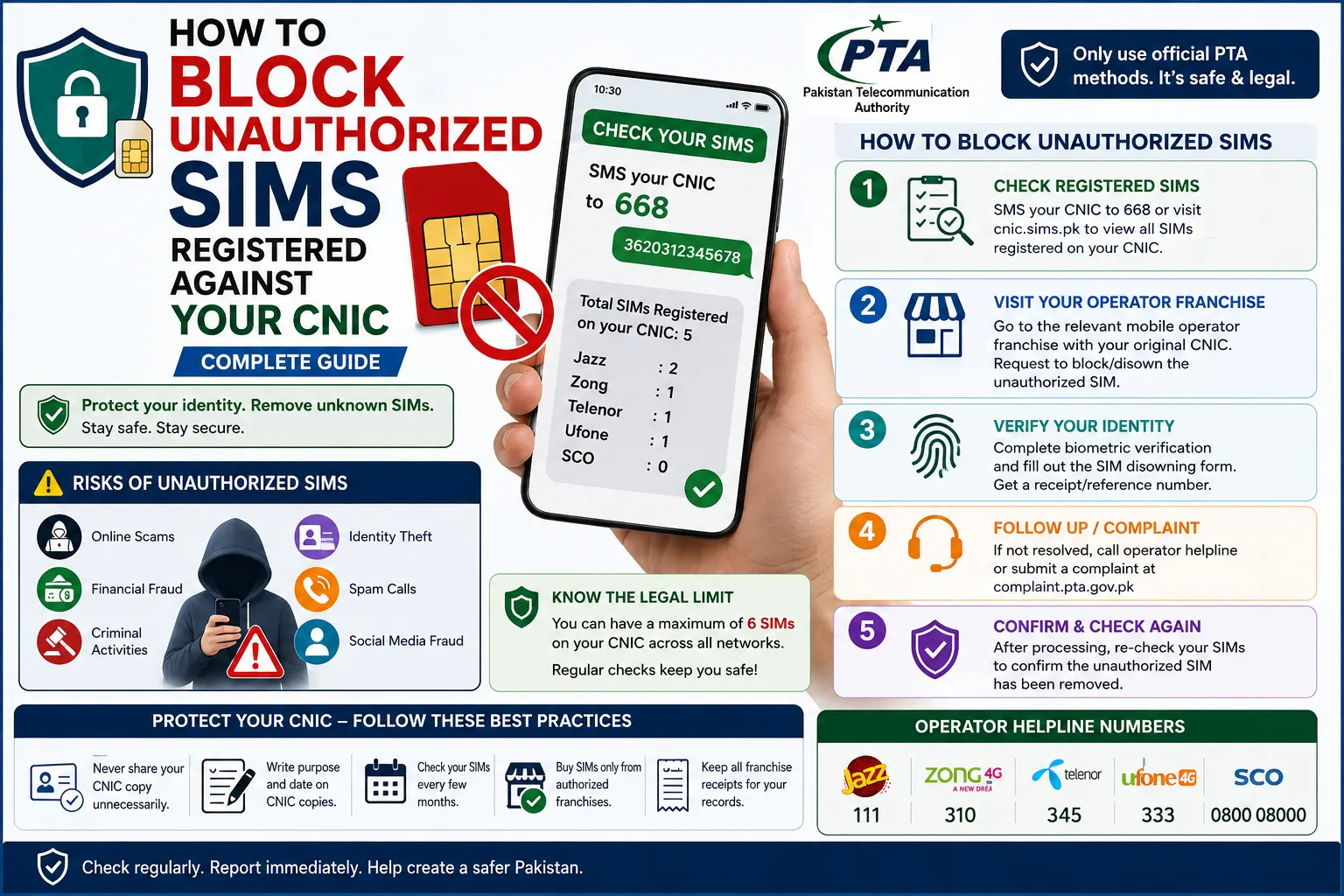
SMS to 668
- Open the messaging app on your phone.
- Type your 13-digit CNIC number without dashes.
- Send it to 668.
- Within a few seconds, you will get a reply showing how many SIMs are registered against your CNIC on each network (Jazz, Zong, Telenor, Ufone, SCO).
This method works on any active SIM and costs a small SMS charge.
PTA’s Official Web Portal (cnic.sims.pk)
- Open your browser and go to cnic.sims.pk.
- Enter your CNIC number.
- Complete the verification/captcha step.
- Submit the form.
- You will see a full, operator-wise list of SIMs registered under your identity.
Verify a Specific SIM (MNP – Code 667)
If you want to know who a specific number is registered to – for example, a second-hand SIM you just bought – send MNP to 667 from that SIM. You’ll get a reply confirming the registered name and network. This is a smart step before linking any second-hand SIM to your bank account or mobile wallet.
Identify the Unauthorized SIM
Once you have your list of SIMs, go through it carefully:
- Cross-check each number with the SIMs you personally own and use.
- Note the network (Jazz, Zong, Telenor, Ufone, or SCO) for any number you don’t recognize.
- Keep this information ready – you will need it at the franchise.
How to Block or Disown the Unauthorized SIM
Once you’ve identified the unknown number, here’s how to get it removed.
Visit the Telecom Franchise (Most Reliable Method)
- Go to the nearest franchise of the network the unauthorized SIM belongs to (Jazz, Zong, Telenor, Ufone, or SCO).
- Bring your original CNIC
- Tell the staff you want to disown/block an unauthorized SIM registered on your CNIC.
- Fill out the SIM disowning form provided by the franchise.
- Complete a live biometric thumb verification to confirm your identity.
- Ask for a receipt or complaint/reference number – keep this safe.
Processing usually takes a short time, after which the SIM is deactivated from your CNIC record.
Call the Operator Helpline
You can also call your network’s helpline and request that an unauthorized SIM be blocked. Common helpline numbers include:
Explain the situation and follow the instructions given. In many cases, you’ll still be asked to visit a franchise for final biometric confirmation.
File a Complaint with PTA (If the Operator Doesn’t Respond)
If your request isn’t resolved within a reasonable time:
- Visit PTA’s complaint portal at complaint.pta.gov.pk.
- Submit your complaint with your CNIC details and any receipts from the franchise.
- Clearly describe the unauthorized SIM issue.
- PTA will follow up with the operator on your behalf.
How to Submit a PTA Complaint
If the issue is not resolved by the mobile operator:
- Submit a complaint through the PTA complaint system.
- Provide your CNIC and details of the unauthorized SIM.
- Keep the complaint reference number for tracking.
Blocking a Lost or Stolen SIM (Different From Disowning)
If the issue isn’t an unknown SIM but your own SIM being lost or stolen, the process is slightly different — you’re asking the operator to suspend that specific number, not remove it from your CNIC record permanently. Contact your operator’s helpline immediately, confirm your identity, and request a temporary or permanent block. You can later get a replacement SIM with the same number using your biometric verification.
What to Do If You Suspect Fraud
If you believe an unauthorized SIM on your CNIC has been used for a scam, threatening calls, or any illegal activity, don’t wait:
- Report it to the National Cyber Crime Investigation Agency (NCCIA).
- Keep your franchise receipt and PTA complaint number as proof that you took action.
- Avoid sharing your CNIC copy unnecessarily in the future, and ask shopkeepers why they need it before handing it over.
Documents Required
Generally, you need:
- Original CNIC
- Active contact number
- Complaint details (if available)
- Reference number (if already reported)
Know the Legal SIM Limit
Pakistan’s Supreme Court set a limit on how many SIMs one CNIC can hold. If your CNIC shows an unusually high number of SIMs, it’s a strong sign that some of them were registered without your knowledge. This limit is one of the main reasons PTA encourages regular self-service- going over the limit, or having SIMs you never activated, is a red flag worth acting on immediately.
What Happens After Blocking?
Once the unauthorized SIM is removed:
- It is no longer linked to your CNIC.
- Your record is updated after processing.
- You can verify the updated status again through the SIM checking service.
How to Protect Your CNIC From Future Misuse
- Never share your CNIC copy unless it’s necessary.
- When you do share it, write the purpose and date on the photocopy.
- Your registered SIMs every few months using 668 or cnic.sims.pk.
- Only buy SIMs from authorized franchises, never from unofficial street vendors.
- Keep your franchise receipts for every SIM you register.
Common Mistakes to Avoid
- Ignoring unknown SIM registrations.
- Sharing biometric verification with others.
- Giving CNIC copies without writing their purpose.
- Delaying complaints.
- Trusting unofficial SIM-checking websites.
Quick Summary
| Action | What to Do |
| Check SIMs | Use the PTA SIM Information System or SMS service |
| Find Unknown SIM | Identify unfamiliar registrations |
| Visit Franchise | Request SIM blocking |
| Verify Identity | Complete biometric verification if required |
| Submit Complaint | Contact PTA if the issue remains unresolved |
| Check Again | Confirm the SIM has been removed |
Frequently Asked Questions (FAQs)
How can I block an unauthorized SIM registered against my CNIC?
Visit the customer service center of the relevant mobile operator with your original CNIC. Complete the verification process and request removal of the unauthorized SIM.
Can I block an unauthorized SIM online?
You can submit a complaint through the PTA complaint system, but identity verification may still be required depending on the case.
How do I know if someone is using my CNIC for a SIM?
The number of SIMs registered on your CNIC through the PTA SIM Information System or by using the SMS service.
Is biometric verification required?
In many cases, yes. Mobile operators use biometric verification to confirm the identity of the CNIC holder before removing or blocking a SIM.
What documents do I need?
Usually, you need your original CNIC and any complaint details or reference number if you have already reported the issue.
How often should I check SIMs on my CNIC?
It is a good practice to check every few months or whenever you suspect misuse of your identity.
Can someone register a SIM using my CNIC without my permission?
Fraudulent registrations can occur through identity theft or misuse of CNIC information. Regular checking helps detect such issues early.
What should I do if the operator does not resolve my complaint?
Escalate the matter through the PTA complaint process and keep all complaint reference numbers for follow-up.
Conclusion
Unauthorized SIMs registered on your CNIC are a real risk, but they’re also easy to fix once you know the right steps. Start by checking your CNIC using the 668 SMS or the cnic.sims.pk portal. If you spot a number you don’t recognize, visit the relevant network’s franchise with your original CNIC, complete the biometric verification, and get it disowned. If the operator delays the process, PTA’s complaint portal is there to help.
Making this a regular habit – once every few months – takes only a minute but can protect you from serious legal and financial trouble down the line. Your CNIC is your identity; keep it clean, and keep it yours.
Disclaimer
The information provided on num.com.pk is for general informational and educational purposes only. We are an independent website and are not affiliated with, endorsed by, or officially connected with Pakistan Telecommunication Authority (PTA), NADRA, or any mobile network operator in Pakistan. SIM, CNIC, mobile network, and telecommunications information may change over time, so users should verify important information through the relevant or authorized sources. num.com.pk does not provide unauthorized access to private SIM databases, CNIC records, mobile-number ownership information, or live location data. We do not guarantee the completeness, accuracy, or current status of all information published on this website. By using our website, you acknowledge that you do so at your own discretion and risk.