Sim Information
In Pakistan, obtaining ‘Sim owner details’ has become increasingly important for various reasons, such as security and verification. Thanks to services like Mobile Number Tracker Pakistan and Live Finder Net, individuals can now access real-time information about mobile number details with name and address.Mobile SIM cards in Pakistan are strictly regulated by the Pakistan Telecommunication Authority (PTA) and linked with your Computerized National Identity Card (CNIC) through biometric verification and This system ensures every mobile number is connected to a real individual, helping prevent fraud, illegal activities and identity misuse and This complete guide explains SIM ownership, how to check SIM details, Minahil Sim Data, Sim Tracker, Pak Sim Data, Pakistan Sim info.
SIM Information Pakistan 2026 — How to Check SIMs, CNIC & Network
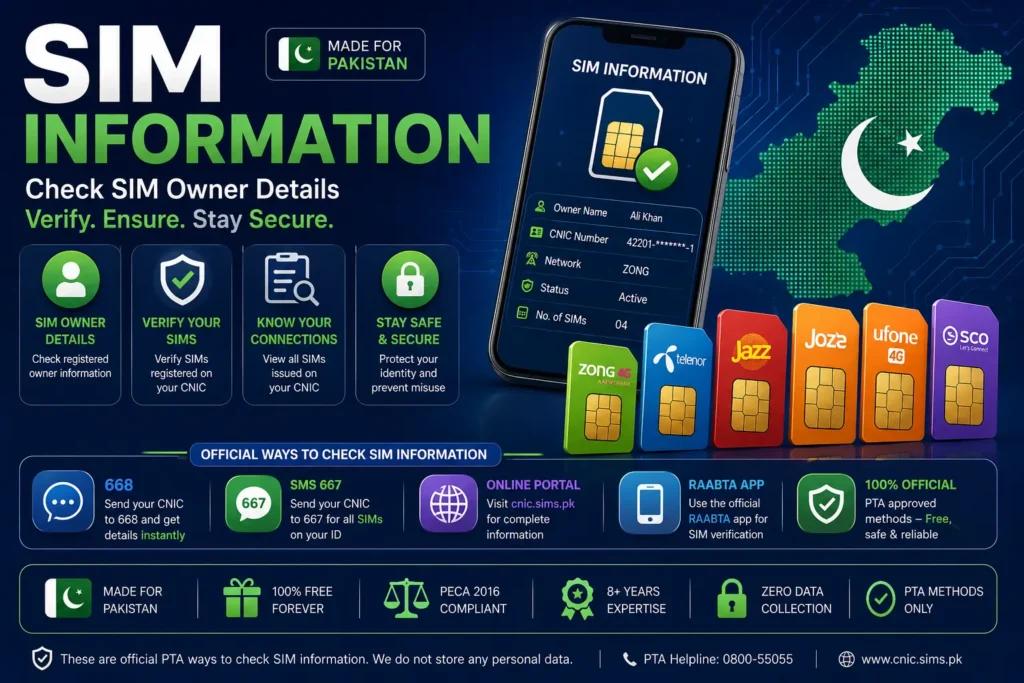
Looking for SIM information in Pakistan? Whether you want to check how many SIMs are registered against your CNIC, verify your own SIM, check a mobile network, or find an unknown SIM linked to your identity, it is important to use the correct and authorized method.
The PTA SIM Information System provides a way for subscribers to check the number of SIMs registered against their CNIC. PTA states that this can be done by sending the CNIC number without dashes to 668 or by using the official online portal at cnic.sims.pk.
This complete guide explains the main SIM information services available in Pakistan, how they work, what information they provide, and what you should do if you find a SIM that you do not recognize.
Important: SIM verification is intended for legitimate, authorized checks. Do not rely on websites claiming that they can reveal another person’s private CNIC, address or complete subscriber record from a mobile number.
What Is SIM Information?
SIM information refers to information associated with a mobile SIM card and its network registration.
Depending on the service, SIM-related information may include:
- Mobile network
- SIM registration status
- Number of SIMs associated with your CNIC
- SIMs issued by different operators
- Verification information
- Network information for a mobile number
However, different SIM-check services provide different information.
For example, the PTA SIM Information System is primarily designed to let subscribers check the number of SIMs registered against their own CNIC, while a network-check service can identify the operator associated with a number.
How to Check SIM Information in Pakistan
There are several legitimate ways to check SIM information depending on what you need.
| What you want to check | Recommended method |
|---|---|
| SIMs registered against your CNIC | PTA 668 |
| Online CNIC SIM check | cnic.sims.pk |
| Network of a mobile number | PTA network-check service |
| SIM you currently possess | Appropriate operator/verification process |
| Unknown SIM on your CNIC | PTA + relevant operator |
| Identity-related issue | Authorized customer-service channel |
The most important thing is to select the method that matches your purpose.
Method 1 — Check SIMs Registered on Your CNIC Through 668
The 668 SIM Information System is one of the most commonly used methods for checking SIM registrations in Pakistan.
According to PTA, subscribers can send their CNIC number without dashes to 668 to check the number of SIMs issued against their CNIC.
Steps to check SIMs through 668
- Open the SMS application on your mobile phone.
- Enter your 13-digit CNIC number.
- Remove the dashes from the CNIC.
- Send the CNIC number to 668.
- Wait for the response.
- Review the SIM registration information.
Example
If your CNIC is displayed as:
12345-1234567-1
enter it as:
1234512345671
The exact response and charges can depend on the current telecom service arrangements.
Method 2 — Check SIM Information Online
If you have internet access, you can use the official PTA SIM Information System.
The portal is:
cnic.sims.pk
The official website asks for your CNIC and provides the SIM-registration checking facility.
How to check online
- Open the official SIM Information System.
- Select the CNIC option.
- Enter your CNIC number.
- Complete the verification shown on the website.
- Submit the information.
- Review the available SIM-registration result.
This method is useful when you prefer an online interface rather than SMS.
What Information Does the PTA SIM Information System Show?
The PTA SIM Information System is designed primarily to show the number of SIMs registered against your CNIC, including a breakdown by mobile network. The official portal displays network categories and the number of SIMs associated with the submitted identity information.
This is different from websites that advertise a “complete SIM database.”
A legitimate SIM check should not be interpreted as unrestricted access to another person’s private identity information.
SIM Information by CNIC
One of the most popular searches is:
“SIM information by CNIC”
If you want to check how many SIMs are registered against your own CNIC, PTA provides two main routes:
- Send your CNIC without dashes to:668
- Use:cnic.sims.pk
- PTA’s official information confirms both methods.
How to Check All SIMs Registered on Your CNIC
If you have used several mobile networks over the years, you may have old SIM registrations that you no longer remember.
A CNIC SIM check can help you review your registrations.
Follow these steps:
Step 1: Keep your CNIC number ready.
Step 2: Use the PTA SIM Information System.
Step 3: Check the result for the different networks.
Step 4: Compare the registrations with the SIMs you currently use.
Step 5: If something looks unfamiliar, contact the relevant operator.
Checking your own SIM registrations periodically can help you identify irregular registrations.
What If an Unknown SIM Is Registered on My CNIC?
If your result shows a SIM that you do not recognize, do not ignore it.
An unfamiliar SIM may be an old connection, an incorrect registration or an issue that requires investigation.
What you should do
Confirm the result using the official PTA system.
Identify the relevant mobile operator.
Contact the operator’s authorized customer service center or franchise.
Explain that the SIM is not yours or is no longer in your use.
Follow the operator’s procedure for correction or disowning.
Keep any complaint or reference number.
PTA has published information about correcting SIM-registration data and removing irregular SIMs from consumers’ CNICs upon request.
Can You Check SIM Information by Mobile Number?
This depends on the information you are trying to obtain.
There is a difference between:
checking the network of a number,obtaining the private identity information of the subscriber.
The official PTA SIM Information System provides CNIC-based checking for your own registrations. The official portal also provides a facility for checking the network of a number.
You should be cautious with websites that claim that entering any mobile number will reveal:
- Full CNIC
- Complete residential address
- Family details
- Private subscriber records
- “Live NADRA data”
Such claims do not make a website an official PTA service.
How to Check the Network of a Mobile Number
Sometimes people search for SIM information simply because they want to know which network a number belongs to.The official PTA SIM Information System currently provides a network-check facility.
According to the official portal, users can check the network of a number by sending:
N 03xx3456789
to:76367
The portal states that this service has an applicable charge.This is useful when you want to determine the operator associated with a Pakistani mobile number.
SIM Information vs SIM Owner Details
These terms are often used interchangeably online, but they can mean different things.
- SIM Information
Usually refers to registration, network or SIM-related information.
- SIM Owner Details
Usually refers to the subscriber associated with a SIM.
- SIM Check by CNIC
Means checking SIM registrations associated with your own CNIC.
- Network Check
Means determining which mobile operator a number is associated with.
Understanding these differences helps you choose the right service.
(2026)
in the System
Phased Blocking
Per SIM Record
Sites Blocked
Method Below
What Is the PTA SIM Information System?
The PTA SIM Information System was introduced to help mobile subscribers determine how many SIMs are issued against their CNIC, including information by mobile operator. PTA has published multiple notices describing the 668 SIM Information System and its purpose.
The system is particularly useful for identity and SIM-registration awareness.
Instead of relying on an unofficial database, users can check their own registrations through the official PTA-supported channels.
Why Should You Check Your SIM Information?
There are several reasons to perform a SIM registration check.
1. Identity protection
Your CNIC is connected with your mobile registrations, so monitoring those registrations can help you identify irregularities.
2. Old SIMs
You may have stopped using a SIM without realizing that its registration remains associated with your identity.
3. Unauthorized registration
An unfamiliar SIM should be investigated.
4. Record accuracy
Checking your information can help you identify registration problems.
5. Security awareness
Your mobile number may be connected to banking, email and social-media accounts, making SIM security important.
SIM Registration in Pakistan
SIM registration in Pakistan involves identity verification and telecom registration requirements.Mobile users should ensure that their SIMs are registered through authorized procedures.PTA has also emphasized proper identity verification and has used the SIM Information System as part of efforts to verify mobile users.If you purchase a new SIM, replace a SIM or transfer ownership, follow the operator’s official process and provide the required identification.
What Is the Difference Between 668 and 667?
People frequently search for both 668 and 667, but they should not be treated as identical services.
668
Primarily associated with checking the number of SIMs registered against your CNIC.
CNIC → 668
667
Associated with SIM-related verification processes for the SIM in your possession.
Because telecom procedures can change, always confirm the current procedure through an official operator or PTA source before relying on an SMS code.
The key point is:668 = CNIC-based SIM registration check
rather than a general public database for identifying strangers.
Is SIM Information Available Free Online?
The official PTA online SIM Information System provides a web-based way to check SIM registrations against a CNIC.However, you should not assume that every website offering a “free SIM database” is trustworthy.Before submitting your CNIC to any website, ask:
- Is it an official government/telecom service?
- Does it clearly explain why it needs my information?
- Is the website secure?
- Does it provide a legitimate privacy policy?
- Is the service actually providing official information?
For your CNIC SIM count, the official PTA-supported portal is the safer choice.
Can You Get Someone’s Full CNIC From a SIM Number?
You should not expect a legitimate public SIM-check service to provide unrestricted access to another person’s private CNIC information.Search results may contain websites or apps claiming to reveal names, CNICs or addresses from mobile numbers, but such claims should be treated with caution.Your own SIM and CNIC can be checked through authorized services.Another person’s private identity information should not be accessed without proper authorization.
How to Protect Your SIM Information
SIM security is part of overall digital security.
- Never share OTP codes
Do not provide an OTP to someone who calls or messages you unexpectedly.
Protect your CNIC
Do not enter your CNIC into random “SIM database” websites.
- Check your registered SIMs
Use the PTA SIM Information System periodically.
- Report suspicious activity
If you discover an unauthorized SIM registration, contact the relevant mobile operator and use appropriate official complaint channels.
- Be careful with SIM replacement requests
SIM-swap and unauthorized replacement attempts can create risks for accounts connected to your mobile number.
SIM Information Pakistan — Quick Comparison
| Need | Best option |
|---|---|
| Check SIM count on your CNIC | 668 |
| Check SIMs online | cnic.sims.pk |
| Check mobile network | PTA network-check facility |
| Find unknown SIM on your CNIC | PTA + mobile operator |
| Correct SIM registration | Relevant operator |
| Identity-related issue | Authorized NADRA/PTA channel |
PTA’s official SIM Information System confirms the CNIC and network-check facilities.
FAQs
What is the official SIM Information System?
PTA’s SIM Information System is available online at cnic.sims.pk and allows subscribers to check SIM registrations associated with their CNIC.
What is 668 used for?
668 is used to check the number of SIMs registered against your CNIC. PTA officially lists the 668 SMS method.
Can I check SIM information online?
Yes. PTA’s official online SIM Information System is available at cnic.sims.pk.
Can I check the network of a mobile number?
Yes. The official SIM Information System provides a network-check facility for Pakistani mobile numbers.
Can I check another person’s SIM owner details?
You should not rely on unofficial services claiming to expose another person’s private identity information. Use authorized services for your own SIM and CNIC.
What should I do if an unknown SIM is registered on my CNIC?
Confirm the result through an official channel and contact the relevant mobile operator to request correction or disowning.
Is SIM information the same as CNIC information?
No. SIM information concerns a mobile connection and its registration, while CNIC information relates to identity records.
Why is my SIM information important?
Your SIM may be connected to banking, email, social-media and other accounts. Keeping your SIM registration information accurate can therefore support better account and identity security.
Conclusion
The safest way to check SIM Information Pakistan is to use the official services designed for subscribers.If you want to check SIMs registered against your own CNIC, use 668 or cnic.sims.pk. If you need to identify the network of a mobile number, use the official network-check facility.Avoid websites that promise unrestricted access to private CNIC or SIM-owner databases. Your goal should be to verify your own information, keep your SIM registrations accurate and protect your personal identity.Check your SIM information. Protect your CNIC. Use official verification channels.