Reactivate Blocked SIM in Pakistan: Cause First, Counter Second
Is your SIM card suddenly stopped working? Before you panic or run to a franchise, you need to know one thing first: why it got blocked. A blocked SIM can happen for several different reasons – unpaid taxes, expired biometric verification, 1 year of inactivity, or a lost/stolen report. Each cause has its own fix, and using the wrong fix wastes your time. This guide explains the common reasons behind SIM blocking and then provides the correct steps to reactivate your SIM safely. Whether you use Jazz, Zong, Ufone, or Telenor, this article will help you understand the process in simple language while following Pakistan’s SIM registration rules.
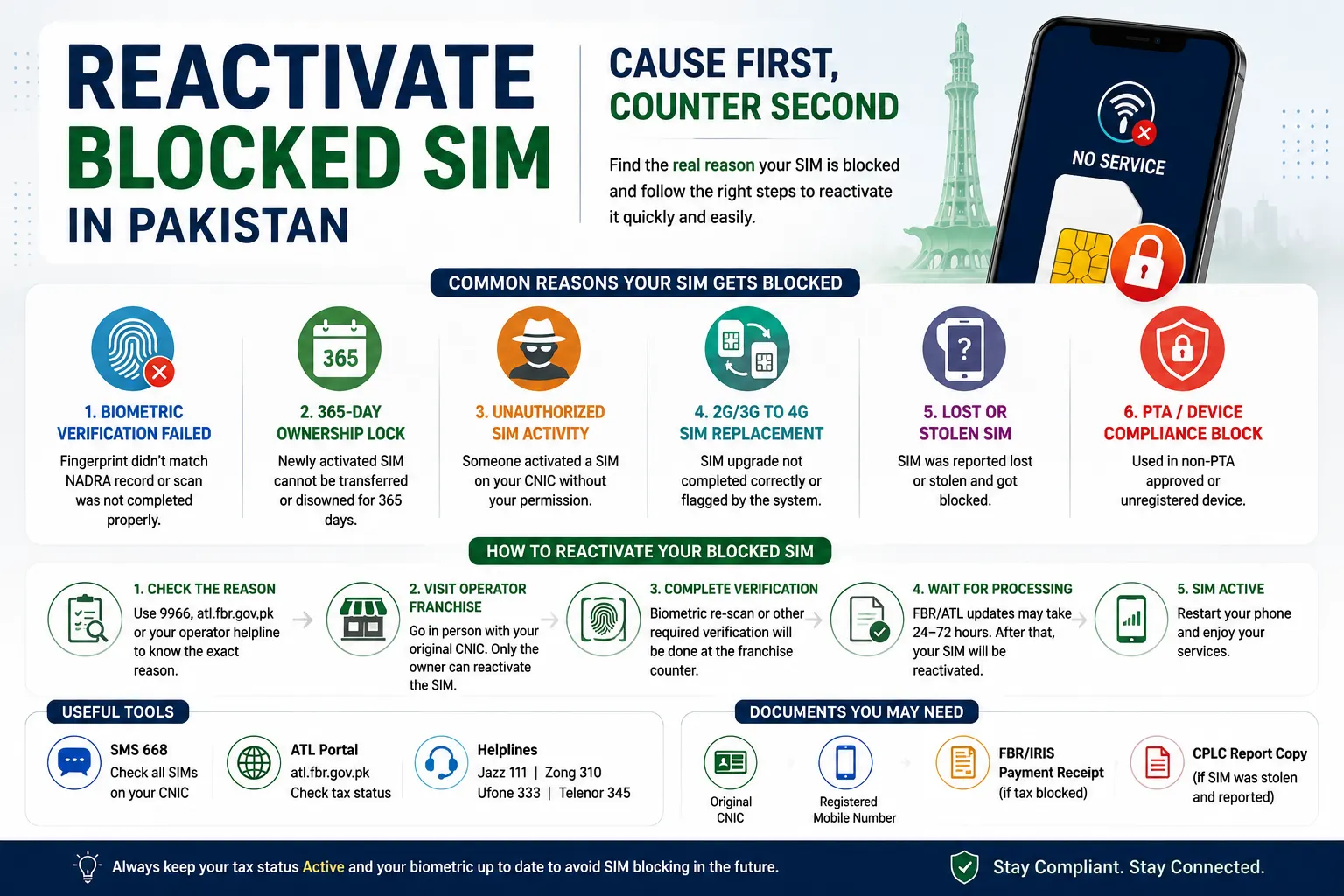
Why Is Your SIM Blocked? (Find the Cause First)
Most people assume every blocked SIM is an FBR tax issue. That’s not always true. Here are the real reasons a SIM gets blocked :
Biometric Verification Failed (BVS Failure)
Every SIM must pass NADRA’s Biometric Verification System (BVS) – a fingerprint match tied to your CNIC. Your SIM can get blocked if:
- The original fingerprint scan was weak or didn’t match cleanly
- Your CNIC has since been renewed, and the biometric record wasn’t updated
- The franchise skipped proper “Live Finger Detection” during registration.
2. The 365-Day Ownership Lock
This is a newer rule most guides miss. Under a PTA advisory (effective May 24–25, 2026), a newly activated SIM cannot be transferred or disowned for 365 days from its activation date. This was introduced to stop fraudsters from repeatedly re-registering the same SIM with fake thumbprints. Practically, this means:
- If your SIM was activated less than a year ago, you can’t formally disown it or transfer it – even if it’s genuinely yours and you want to move it
- If someone else registered a fraudulent SIM on your CNIC recently, you can still file a complaint immediately, but the physical disowning may be delayed until the 365-day window passes
3. Unauthorized Franchise/Agent Activity
This is a real, documented fraud pattern – not just user error. Confirmed cases show franchise staff activating SIMs on customers’ CNICs without their knowledge, sometimes using stolen CNIC copies or bribed employees. One raided franchise in Lahore had laptops, biometric devices, and roughly 150 unregistered SIM cards on hand. Warning signs:
- Unexpected calls/SMS from unknown numbers tied to your CNIC
- A “BVS failed” message on a SIM you’ve owned for years
4. SIM Technology Swap (2G/3G to 4G Replacement)
When you upgrade an old 2G/3G SIM to a 4G SIM at a franchise, the process itself requires biometric re-verification, since it’s technically a new SIM issuance under your CNIC. If the swap isn’t completed correctly – or if it triggers a duplicate registration flag on the network’s fraud-detection layer – the new SIM can end up blocked pending manual review. This overlaps with the unauthorized-replacement issue above, since technology swaps are one of the more common excuses used by dishonest agents to push a fraudulent re-registration.
5. Lost or Stolen SIM Block
If you reported your SIM as lost or stolen, or if someone else reported it on your behalf, the operator blocks it to protect you from misuse and fraud.
6. PTA Compliance or Unregistered Device Block
SIMs used in phones that are not PTA-approved, or SIMs linked to unauthorized/unregistered connections, can also be blocked as part of PTA’s device compliance rules.
How to Check the Real Reason Your SIM Is Blocked
Don’t guess – confirm it. Use these methods first:
- SMS for Tax Status: Send your CNIC number (without dashes) to 9966. You’ll get an instant reply telling you if you’re an Active Taxpayer or not.
- Online ATL: Visit atl.fbr.gov.pk, enter your CNIC or NTN, and see your current status along with the reason if you’re inactive.
- IRIS Portal: Log in to IRIS with your CNIC/NTN and password, go to Profile → Taxpayer Status, to see full filing history.
- Call Your Network Operator: Dial your operator’s helpline (Jazz 111, Telenor 345, Zong 310, Ufone 333) and ask them to confirm the exact block reason on their system – tax, biometric, inactivity, or security.
- FBR Helpline: Call 051-111-772-772 from any phone if you suspect it’s a tax-related block.
Complete Method to Reactivate a Blocked SIM against CNIC
Biometric Verification Failed (BVS Failure)
- Check your BVS status first. Send “V” to 7911 (Zong/Ufone) or your CNIC to 6001 (Jazz) / 7751 (Telenor).
- If it shows “Not Verified,” visit your operator’s franchise in person – this cannot be fixed online or by phone.
- Bring your original CNIC.
- Complete a fresh fingerprint scan at the counter. This is free of charge.
- If your fingerprint keeps failing at the franchise, go to a NADRA Mega Center instead – they have higher-precision scanners.
- Ask for a reference/receipt number before leaving as proof of your visit.
- Timeline: Same-day fix at a franchise; recurring failures resolved at a NADRA Mega Center typically take 7–15 working days.
The 365-Day Ownership Lock
- First, confirm your SIM’s activation date – you can ask the franchise or open your operator’s app.
- If it’s been less than 365 days since activation, understand that formal transfer or disowning will be delayed – this is a fixed PTA rule, not something the franchise can override.
- If the SIM is genuinely yours and you just want to keep using it, no action is needed – the lock only affects transferring/disowning, not normal usage.
- If it’s an unauthorized SIM sitting on your CNIC that you want removed, don’t wait it out – file the complaint immediately anyway. The dated complaint is what protects you legally, even if physical removal is delayed.
- Screenshot your SIM ownership from 668 with today’s date visible, as evidence.
- Visit the franchise, request “SIM Disowning,” and simultaneously file a PTA complaint at 0800-55055 the same day.
- Timeline: Complaint is logged instantly; actual disowning may only be completed once the 365-day window from activation has passed.
Unauthorized Franchise/Agent Activity
- How many SIMs are registered on your CNIC? Send your CNIC to 668.
- Count the SIMs shown against what you actually own. Any extra number is unauthorized.
- Screenshot the result immediately, with the date clearly visible – this is your evidence.
- Call your operator’s helpline and ask them to block the unauthorized SIM right away.
- Visit the franchise in person with your original CNIC and request “SIM Disowning.” This requires your biometric verification to confirm you’re the real CNIC holder.
- File a formal complaint with PTA at 0800-55055 the same day, referencing your screenshot and franchise visit.
- If you suspect financial fraud, also report it to your bank immediately and to FIA’s cybercrime wing.
- Timeline: Blocking is usually instant on request; formal disowning depends on the 365-day rule if the fraudulent SIM was recently activated.
SIM Technology Swap (2G/3G to 4G Replacement) Getting Blocked
- Only get this upgrade done at a franchise – never through a street vendor or unofficial agent.
- Bring your original CNIC, since the swap legally counts as issuing a new SIM under your identity.
- Complete the biometric fingerprint scan at the counter and confirm with the staff, on the spot, that verification succeeded before you leave.
- Ask for a receipt/reference number for the swap.
- As soon as you get home, check your SIM count via 668 to confirm only one SIM (the new 4G one) is active under your CNIC – not two.
- If the new 4G SIM shows as blocked or “pending verification” after the swap, call your operator’s helpline first to find out the reason.
- If it’s a BVS issue, follow the Cause 1 steps above to re-verify at the franchise or a NADRA Mega Center.
- If you suspect the agent mishandled or duplicated your registration, follow the Cause 3 steps.
- Timeline: A clean swap activates within a few hours; a flagged/duplicate registration can take longer to clear depending on which issue caused it.
Reactivating a SIM Blocked by FBR
- File your pending income tax return through the FBR IRIS portal.
- Pay the ATL surcharge: Rs. 1,000 for individuals, Rs. 10,000 for AOPs, Rs. 20,000 for companies.
- Wait 24 to 72 hours. Your SIM usually reactivates automatically once you appear on the ATL.
- If it’s still blocked after 72 hours, call the FBR helpline at 111-772-772 or contact your operator.
A Lost or Stolen SIM
- Visit the nearest franchise with your original CNIC.
- Request a SIM replacement after biometric verification.
- Report any fraud concerns to your operator’s helpline immediately.
SIM Blocked for PTA/Device Compliance
- Confirm whether your phone’s IMEI is PTA-approved by checking the DIRBS system.
- If not approved, register the device through the PTA portal and pay any applicable duty.
- Once your device is compliant, contact your operator to lift the SIM block.
Quick Comparison: Cause, Fix, Time, and Cost
| Block Reason | What to Do | Time | Approx. Cost |
| FBR Non-Filer | File tax return and pay ATL surcharge | 24–72 hours | Rs. 25,000 |
| Biometric Expired | Re-verify fingerprint at a franchise | Same day | Free or small fee |
| 180-Day Inactivity | Visit service center with CNIC | Same day* | Rs. 100–200 |
| Lost/Stolen SIM | Visit franchise and request reactivation | A few hours | Free or replacement SIM fee |
| PTA/Device Block | Register the device through DIRBS | Varies | Depends on device duty |
Documents You May Need
- Original CNIC: Take your original CNIC when visiting the franchise.
- Registered Mobile Number: Keep the blocked SIM number with you.
- FBR Payment Proof: If the SIM is blocked due to tax issues, keep your IRIS payment receipt.
- CPLC Report: If your SIM was stolen and reported, take a copy of the CPLC report.
Common Mistakes to Avoid
- Do not assume it is a tax problem: First, find out why your SIM is blocked.
- Do not rely on online reactivation: For biometric verification, visit the operator’s franchise.
- Do not wait too long: An inactive SIM may be given to another customer after the allowed period.
- Do not send another person: The registered CNIC holder should visit the franchise for verification.
- Do not expect instant activation after tax payment: The tax status may take some time to update before the telecom company can process the SIM.
Conclusion
A blocked SIM isn’t always about unpaid taxes – it could be a biometric issue, months of inactivity, a lost/stolen report, or a device compliance problem. The fastest way to fix it is exactly what this guide does: find the root cause first, then apply the corresponding counter. Check your status through 9966 or atl.fbr.gov.pk, visit your operator’s franchise with your original CNIC when in-person verification is needed, and keep your ATL status active going forward to avoid this problem again. Following the right steps in the right order will get your SIM working again with the least amount of hassle.
Frequently Asked Questions
Why is my SIM suddenly not working in Pakistan?
Your SIM may be blocked due to a tax issue, biometric problem, long inactivity, a lost/stolen report, or an unknown SIM registered on your CNIC. Find the reason before taking any action.
How can I check why my SIM is blocked?
You can find SIMs registered to your CNIC using the official methods. For tax-related issues, your FBR tax status.
What does BVS failed mean?
BVS means Biometric Verification System. A failed BVS usually means your fingerprint did not match the record. Visit your network franchise with your original CNIC for verification.
What is the PTA 365-day SIM rule?
A newly activated SIM may have a 365-day restriction on transfer or disowning. This rule does not normally stop you from using your own SIM.
How can I remove an unknown SIM from my CNIC?
First, find out the SIMs registered on your CNIC. If you find an unknown SIM, visit the network franchise with your original CNIC and request SIM disowning. You can also report the issue to PTA.
Can a franchise activate a SIM on my CNIC without my permission?
SIM fraud can happen. If you receive an unexpected SIM-related message or find an unknown SIM on your CNIC, report it to the network operator and PTA.
Why did my SIM stop working after a 3G to 4G upgrade?
A 4G SIM replacement may require new biometric verification. If verification is not completed correctly, the SIM may be blocked.
How long does FBR SIM reactivation take?
After your tax status becomes active, SIM reactivation may take some time. If the SIM remains blocked, contact FBR or your mobile network.
Can someone else reactivate my SIM?
Usually, the registered CNIC holder must visit the franchise for biometric verification.
Is there a fee to reactivate a blocked SIM?
The cost depends on the reason. Biometric verification may be free, while a replacement SIM may have a small fee. Tax-related blocks may require payment of the applicable tax amount or surcharge.
Can I check my SIM status from outside Pakistan?
Some SIM and CNIC checking services may be available online or through other official channels. Availability can depend on the service and your situation.
Disclaimer
The information provided on num.com.pk is for general informational and educational purposes only. We are an independent website and are not affiliated with, endorsed by, or officially connected with PTA, NADRA, or any mobile network operator in Pakistan. SIM, CNIC, mobile network, and telecommunications information may change over time, so users should verify important information through the relevant or authorized sources. Our tools does not provide unauthorized access to private SIM databases, CNIC records, mobile-number ownership information, or live location data. We do not guarantee the completeness, accuracy, or current status of all information published on this website. By using our website, you acknowledge that you do so at your own discretion and risk.